
Anilab APK Download Now | Official 2026
Anilab2 is an anime streaming app. It targets anime fans who love quick and free access. They can watch anime episodes, anime movies, and anime series. So, just pick a title and press play. Mainly, it is built for Android devices.
Download Now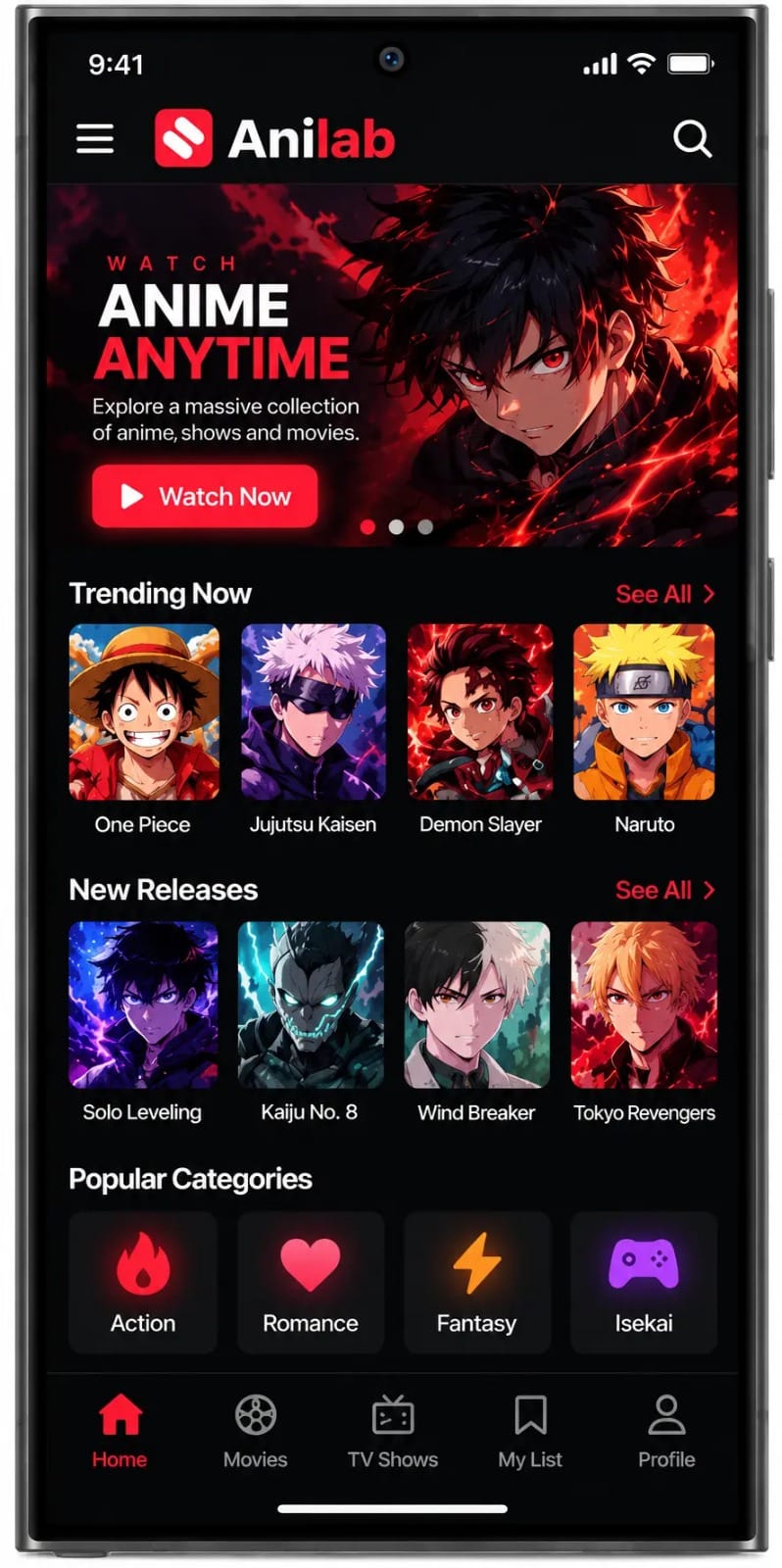
| App Name | Anilab2 App |
| Version listed | 1.0.5 |
| Main platform | Android |
| Category | Entertainment |
| Price | 0$ |
| Devlepor | Anilab Teams |
| Video quality | SD and HD |
| Developer name | Anilab2 App |
| Updated | Today |
| Downloads | 10M+ |
Anilab vs Anilab2 APK: What Changed?
Anilab came first. Many fans used it daily. Then it started failing for some users. Pages stopped loading. Episodes refused to play.
Anilab2 appeared as a follow-up. It appeared as a fresh replacement. The idea is easy while also keeping the old feel.
The two names look alike, which is confusing. Moreover, websites mix them up. First, check the exact app name, because spelling gaps matter online.
Anilab2 claims better navigation. It also claims smoother playback. These claims come from its promoters. We cannot confirm each one. Your own test is the best proof.
Table of Contents
Main Features of Anilab2
Let us walk through each feature. We keep notes short and fair.
Simple Menus
Due to the clean layout, users can search, see the latest content, genres, and the My List section. No menu feels buried. New users learn it fast.
No Account Needed
You do not make a profile, which skips emails and passwords. Open the app and browse. Surely, this feature saves you time. It also shares less personal data.
Free Access
The app asks for no payment. There is no plan to buy. Listings also say there are no hidden fees.
Offline Downloads
On the other hand, users can save episodes first and then watch them later without data. This helps on flights and long rides. It also helps in weak signal zones. So, plan downloads when your device is connected to Wi-Fi.
Watch Progress
The app remembers your activity. Close it mid-episode. Return tomorrow and resume. That is why you never have to search for your desired content again.
Custom Favorites List
You can also build your own shortlist. Save shows you plan to see. Add titles as you find them.
Smart Search
Simply type a name to find a show. You also have a chance to filter by year or genre. That is why you can sort by popularity or newest. Search saves a lot of scrolling.
Dubbed and Subbed Choices
Some fans love original voices. Others prefer their own language. The app lists both styles. Availability depends on each title.
Ad-Free Viewing
Anilab2 APK is free from ads, which is a real benefit. Users can watch their favorite anime content without any irritation,
Video Quality and Streaming Speed
The app lists SD and HD. The latest version mentions higher video quality like 1080p and even 4K. However, be careful with that last claim.
Quality depends on your network. A strong link gives a sharp picture. A weak link causes pauses. So, lower the setting on your low-end device when the screen stops. This simple trick often works.
Your phone also plays a role. Old devices struggle with big files, but advanced device chips handle them better. Close other apps before watching. This frees up memory.
Subtitles, Dubs, and Language Options
Language support shapes the viewing mood. A good subtitle track adds depth. A strong dub opens doors for new fans.
Anilab2 claims multi-language support. English subtitles are common. Other tracks exist for some shows. However, quality varies by title.
Try the subtitle menu during playback. Change the size if the text looks tiny.
Explore Popular Genres on Anilab2 APK
Anime covers unlimited titles. And this app is categorized into countless sections.
Action and Adventure
So, it lets all anime lovers stream rising heroes, duels, and deadly quests. On the other hand, intense fights create electrifying entertainment for all anime lovers.
Romance and Comedy
Such genres bring laughs to your face with romantic feelings. As a result, your soul becomes calm, and evenings are more relaxed.These entertaining anime sections focus on feelings and laughs.
Fantasy and Sci-Fi
Here, users have a chance to watch distant planets and Magic worlds. So, strange technology is shown in videos beyond your imagination.
Drama and Slice of Life
Through this free streaming app, you can watch anime dramas where quiet stories are broadcast, which give you warm feelings.
Horror and Mystery
Late-night viewers enjoy horror and mystery video content where clues unfold in every step of the scene.
Pick any anime genre that matches your mood. Then try two or three episodes.
How to Install Anilab2 on Android
The app is not available on Google Play. That is why users need an APK file.
Step 1: Select your link
Use only our reliable and safe website. Random links invite trouble. First, compare a few links as well.
Step 2: Download the APK file
Click on the download option. Wait until it finishes. After that, check the file size.
Step 3: Scan the App
Utilize a verified mobile security app. Run a full file scan. Skip the install if it flags anything.
Step 4: Allow installs
Open your phone settings. Search “Install unknown apps.” Allow it only for your browser or file manager.
Step 5: Tap the APK
Your phone starts the setup. Press Install and wait. Then open the app.
Step 6: Turn the setting off
Go back to Settings. Disable unknown app installs again. This keeps your phone safer.
Anilab2 on iPhone and iPad
The app has no official iOS release. Because it is still in the development phase.
Some guides suggest third-party app stores. They claim these can load the app. Be very cautious here. Unofficial stores carry extra risk. They may ask for broad permissions. Some may expose your device data.
Also note a technical point: iPhones do not use APK files. Because the format belongs to Android. A safer plan exists for iOS users. Use an official anime app from the App Store. Browser-based legal sites also work well.
Anilab2 on Windows PC
Big screens make anime more appealing. Through an emulator, Android applications can be run on a PC. In this regard, NOX PLAYER and BLUESTACKS are common.
- Download the most popular and secure emulator only from its official site. Then install and sign in if required.
- After that, access the emulator’s built-in browser.
- Download the Anilab2 APK file.
- Open the chosen file inside the emulator.
- Finally, open the Anilab2 app and start browsing
- Keep the emulator version fresh.
Anilab2 on Smart TV and Android TV
TV viewing feels quite attractive. Setup takes only a minute.
Method One: USB Drive
- Download the APK on your computer.
- Copy it onto a USB drive.
- Install a file manager on the TV.
- Plug the drive into the TV.
- Allow unknown app installations.
- Open the APK from the file manager.
Method Two: Android TV Box
- Link the box to the TV with HDMI.
- Insert the USB drive into the box.
- Enable unknown app installations.
- Run the APK from the drive
A remote control can feel odd in a phone-style app. Therefore, a small wireless mouse can help.
Anilab2 on Firestick and Fire TV
Amazon’s stick supports sideloading. The steps are short.
- Open Settings on the Fire device.
- Go to My Fire TV, then Developer Options.
- Switch on apps from unknown sources.
- Install a downloader app from the store.
- Enter the app’s web address inside it.
- Download and install the APK.
Delete the file after setup. That frees storage. Fire sticks have little space.
What About Roku?
Roku cannot install APK files. Its system does not support them. Do not waste time on tricks.
You can still mirror from your phone. Install the app on your Android device. Turn on screen mirroring in Roku. Use your phone’s cast option. Pick your Roku from the list. Then play any episode.
Is Anilab2 Safe?
This is the biggest question. The honest answer is mixed. Let us break it down.
APK files from outside stores carry real risks. A fake copy can hide malware. But they can show harmful ads and track your activity. However, modded versions are the riskiest.
You can lower your risk. Follow these habits.
- Download Anilab2 APK from a well-known link only.
- Before installing, scan all APK files.
- Whatever permission the app seeks, re-evaluate.
- Re-evaluate the permissions the app asks for.
- And deny all aspects that are not related to the video playback feature.
- Keep your smartphone updated all the time.
Is Anilab2 Legal?
Legality needs a closer look. The app is not on official stores. It offers many titles for free. Licensed services usually pay for those rights. So the source of this content is unclear.
One related site even says legality depends on place and content. It also urges viewers to back official platforms. That is a fair warning.
Common Issues and Easy Fixes
Apps fail sometimes. Most issues have simple answers.
The APK Will Not Install
A broken download is a top cause. Delete the file and fetch it again. Check your free storage next. Make sure unknown installs are allowed. Also confirm your Android version is not too old.
Videos Keep Buffering
Slow internet is the usual reason. That’s why, first of all, lower the video quality. Switch between mobile data and WiFithe. For the in-built player, you can try another server as well.
The App Crashes
Clear its cache in phone settings; in Settings, clear the Anilab2 cache. After that, restart your Android device. Furthermore, update the existing app to the newest version. If the issue still persists, then remove the already downloaded app and reinstall. Close all background applications to free up memory.
Episodes Will Not Load
The source can be down. Try again in an hour. Check if other websites open. Restart your router if needed.
Subtitles Are Out of Sync
Switch to another subtitle track. Reload the episode. Try another server. Timing often differs by source.
Anilab2 APK Alternatives
Crunchyroll
This is the biggest name in the field. It has a huge catalog of series and films. New episodes often arrive soon. A free version exists with ads, but paid plans remove them.
HIDIVE
This service targets dedicated fans. It carries many niche and fresh titles. Its price is modest.
Netflix
Its anime range keeps growing. It offers original series and licensed hits. Dubs are common.
Amazon Prime Video
Some anime come with the membership. Others can be rented. The player is smooth.
Tubi and Pluto TV
These platforms are free with ads. Their anime lists are smaller. They still hold real entertainment.
Official YouTube channels
Studios post select episodes and trailers. Some stream full series legally
Smart and Useful Tips for Better Viewing
A few habits upgrade any anime night.
- Download episodes before a trip.
- To save mobile data,ata use Wi-Fi.
- Beforehand, charge your smartphone.
- For clearer dialogue, use headphones.
- Each week, build a short watchlist.
- Start with one new series. Finish it before adding another.
- Take eye breaks every hour. In dark rooms, dim the screen.
- To share your favorite Anime content, join Anilab2 APK fan forums. Ask other viewers for tips. Because often recommendations beat the algorithm.
Privacy and Data Habits
Free apps still cost something, which is your data as a price. That is why you should think seriously about what an application can see.
After installing, check the permissions list first. A video player needs network access. It rarely needs your contacts. It should not read your messages. It has no use for your microphone. Remove any access that seems odd.
Keep updating your smartphone security patches more often. Old software has known holes,les and attackers love those holes. A fresh patch closes many of them.
In this regard, consider a reliable VPN or trusted DNS filter. Such tools block almost all known bad websites. However, treat such apps like a small extra layer.
Who Should Skip Anilab2 App?
Not every viewer fits this app. Some people should choose another route.
Parents of young children need to be more careful. Unlicensed streaming applications cannot filter the content by age. Mature scenes can appear without warning. Kid-safe services offer proper age controls.
Company devices follow strict rules. Sideloaded apps can break those rules and also trigger potential security alerts.
Fans who care about studios can want a different path. Paid views fund new seasons. Many beloved shows end early due to weak sales. Your subscription can help save a story you love.
A Smarter Way to Budget for Anime
Many fans avoid paid plans due to cost. That is why a little but wise planning cuts the cost instantly.
Select one service per season. Watch what you want there. Cancel when you finish. Then switch to another service next season. This rotation keeps yearly spending low.
Use free tiers first. Several licensed sites show episodes with ads. Some release new episodes a week late for free users. Patience saves money.
When allowed, share family plans cost with your anime-interested relatives. First, check each provider’s rules.
Watch for student discounts and bundle deals. Telecom companies sometimes add streaming services. Look at your phone plan before paying extra.
Borrow from your library. Many cities offer free digital media. Anime sections are growing every year.
How to Spot a Fake Anilab2 APK Page?
Fake pages copy popular names. They aim to trick eager downloaders. So, look for warning signs and check the web link closely. Odd endings and extra hyphens are red flags. Sometimes, a tiny change in spelling can hide a trap.
Watch for big download buttons. Apps with five fake Download banners often hide malware. The real link is usually plain.
Beware of prize pop-ups and surveys. In fact, no video app demands users’ phone numbers to start.
Check the file type. An Android app ends in .apk. A file ending in .exe is wrong for a phone. A zip with a password is also a bad sign.
Compare file sizes across sources. A huge gap means someone changed the file. Stay far from altered copies.
Final Words
Anilab2 attracts fans with its free access and vast range of anime movies and shows. Its layout is simple. Its feature list sounds rich. Offline saving and watch history add comfort.
However, this app is accessible through unofficial stores. Its content rights remain unclear. Many fake Anilab2 APK copies are available, so first verify security, then download only the official one. Scan every file and limit permissions.
As a result, you get a stable app and clean video. On the other hand, creators earn what they deserve. Anime is the best way to enjoy watching entertaining content.
FAQs
Is Anilab2 APK free?
Yes. The app asks for no fee. Extra costs appear through fake copies.
Do I need an Anilab2 account?
No. The app reportedly works without sign-up.
Is Anilab2 on Google Play?
No. You must use an APK from outside the store.
Can I watch offline?
Yes. The app lists download options for chosen episodes.
Does it work on iPhone?
Not officially. An iOS version is said to be in progress.
Can I use the Anilab2 APK on my laptop?
Yes, with an Android emulator, you can use it on your laptop. And the entire process takes a couple of minutes.
What if the Anilab2 APK stops working?
First, clear the cache. Then reinstall the app. If that fails, move to another streaming link.
Is the Anilab2 modded version better?
No. Modded files add unknown risk.
How can I check an Anilab2 APK for danger?
Scan it with a reliable security tool. Compare its file size with the existing size. After that, review requested permissions with proper attention.
Which is the secure option overall?
A licensed streaming service wins on safety. It also pays the people behind each show.